Ethernet Cable Categories Explained: Cat5e, Cat6, Cat7 & Cat8
Choosing the right data cable—whether Cat5e, Cat6, Cat7, or Cat8—can be challenging given the wide range of options. Each category offers distinct grades, specifications, and performance levels, catering to a wide range of project requirements, even the most complex ones. Before committing to a specific type of cable, it’s essential to understand the key differences between them. This knowledge helps ensure you select the correct cable for your project, avoiding potential issues caused by installing an unsuitable specification.
How Do Ethernet Cables Work (Cat5e to Cat8)?
A data cable consists of 8 copper wires bundled into a single sheath. This data cable provides electrical signal transmission between two devices
The termination ends of the data cable are standardised to create a standard connector. Especially for all patch leads, patch panels and data termination plugs. Furthermore, the high categories of cabling these connectors have kept the outline of the standard and evolved into additional contacts for faster transmission speeds
What is data cabling used for?
Data cabling is essential for connecting network components to central hosting hardware, such as a data switch or an internet router.
It allows various devices to access external connections or communicate with other devices within the internal network. Common examples of connected devices include PCs, phones, printers, CCTV systems, Wi-Fi access points, and more.
What’s the Difference Between Voice and Data Cabling?
In legacy systems, voice and data cabling were typically separate installations. Data cabling was used to connect devices like computers, Wi-Fi access points, and printers to the network via a data switch. Meanwhile, telephones relied on voice-specific wiring, such as CW1308 (BT Standard), connected directly to the hosted telephone system.
In most modern setups, a unified approach is used. The same type of cabling is installed for all devices and terminates in a central cabinet. Devices are then “patched” into the appropriate data or telephone systems, often via a shared switch housed within the cabinet. This versatile, organised method, known as structured cabling, offers greater flexibility and efficiency for modern networks.
Read more about structured cabling: Why is structured cabling important?
Key Differences Between Cat5e, Cat6, Cat7, and Cat8
- Cat5e: Affordable, up to 1 Gbps and 100 MHz, ideal for home and small offices.
- Cat6: Faster at up to 10 Gbps (short distances) and 250 MHz, suitable for medium-sized networks.
- Cat7: Enhanced shielding, up to 10 Gbps and 600 MHz, perfect for high-performance setups like data centres.
- Cat8: Ultra-fast at 40 Gbps (short distances) and 2000 MHz, designed for data centres and advanced systems.
Higher categories offer faster speeds, better shielding, and future-proofing, but at a higher cost and shorter maximum distances for peak performance.
What Is Cat5 Ethernet Cable?
One of the older categories of copper wire data cables, Cat 5 cabling, was adopted as the standard cabling choice in 1995. Consequently, this enabled 10/100 Mbps Ethernet at distances up to 100 metres. However, this has now been surpassed by several other cabling categories (including Cat 5e, with lower crosstalk and noise). Nevertheless, Cat 5 is still found in a small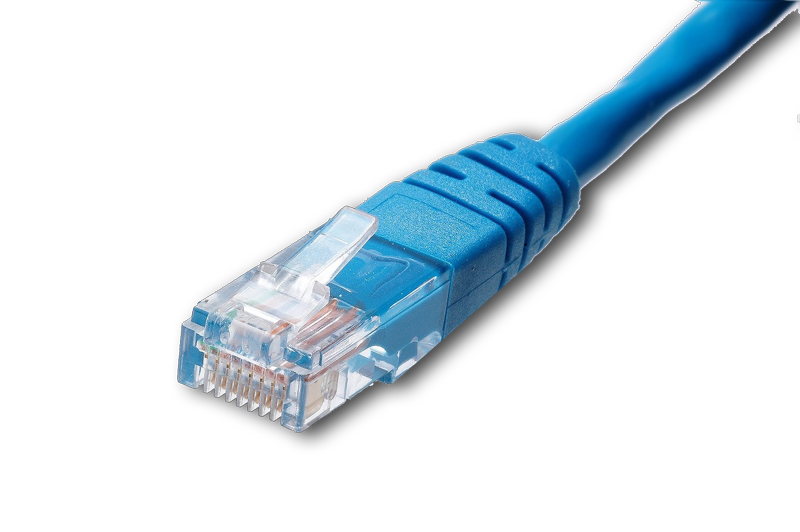 number of offices, although these have usually been present for a long time. These installations, in particular, are now very rare
Cat5e then became the standard and offered 1 Gigabit speeds, which deterred existing businesses from upgrading their cabling systems unless they were undergoing a re-fit or office relocation. As we advance, however, consumers are looking for something a little more long-term that can deliver enhanced speed and reliability, and this moves the cabling choice up through Cat6 and beyond
In 2021, Data cabling moved from Cat5e to Cat6, and increasingly to Cat6a, especially in new builds in major cities such as London and Birmingham. Warehouse Wi-Fi systems are recommended to use Cat6a due to increased interference and longer runs in those buildings.
However, Cat5e cabling is still very much suitable for 1 Gigabit transmission and therefore suitable for the majority of current client needs. For example, Cat5e and 1 Gigabit speeds are more than enough for all current VoIP phone systems. Therefore, when a client has a budget-conscious plan, then Cat5e cabling can still be the preferred installation choice. However, if the client is planning on occupying the building for some time, then Cat6a and future 10 gigabit capabilities are the better design option
Even though, as mentioned, Cat5e cabling is being phased out in newer installations, we still receive many questions about its suitability.
For information on Cat5 Ethernet cable categories and their applications, see below.
Cat5e Cable FAQ – 19 Frequently Asked Questions
Difference between Cat5 and Cat6
Do Cat6 cables work with Cat5?
What Is Cat6 Ethernet Cable?
Cat 6 cabling was launched in 2002 and, thanks to its copper wires being more tightly wound than Cat 5 cables, it soon became the dominant data cable in the market and maintains this position today. Although extra care is required when installing Cat 6 cabling compared to Cat 5, the benefits easily outweigh the additional installation time and minor budget increase. Finding popularity in audio and visual niches, Cat 6 cabling can also support Gigabit Ethernet at 100m and 10 Gigabit Ethernet up to 55m. However, as all data cabling standards are usually designed at 90m/100m, the choice for 10 Gigabit Ethernet is Cat6a and upwards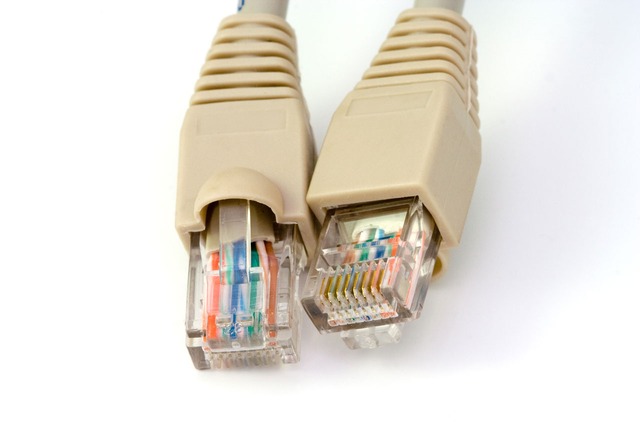
For the past 5 -10 years the choice to ‘future proof’ your network cabling has been Cat6 cabling. Cat6 is backwards compatible with Cat 5 cabling, so there’s no need to dismantle your existing networks completely, and you can still maintain your existing hardware
Latest Cabling Technologies
Cat6a is increasingly becoming the standard for new build projects and many relocation requirements. This is due to the increasingly rapid move towards 10 Gigabit Internet and the data cabling required to transmit it.
Cat6 cabling can actually transmit 10 gigabits up to 55 metres; however, when designing a data cabling installation, you want to ensure the standard is met at all stages. Therefore, data cabling is ratified and designed for 90-metre permanent links, with an allowance of 10m for patch leads. If you think Cat6 cabling will be ok, but the installation runs exceed 55 metres, then 10 Gigabit capability will be lost.
In the majority of larger London offices, we install into there is always a proportion of data cables that will exceed 55 metres and even be close to the 90 metre maximum
Therefore, it is better if you require 10 Gigabit now or in the future to install at a minimum a Cat6a cabling solution for you IT Cabling infrastructure. In fact, the Department for Education has specified that all new cabling for schools and colleges should now be Cat6a for School Wifi, with OM4 fibre backbones to achieve 10 Gigabit.
In response to a large number of Cat6 queries, we created additional information in the following articles
Cat6 Ethernet Cable: Frequently Asked Questions
Questions include, among others
- What is Cat6 cable?
- What is the Cat6 speed?
- How much is Cat6 Cabling? Cat6 price per point? – (Click for detailed article)
- Cat6 cabling vs the other categories of cabling
- Can I run HDMI over Cat6?
- What is external Cat6, and what is shielded Cat6?
- Can you use Cat6 cable for Telephone? – (Click for detailed article)
- How to test Cat6 cable?
Should You Upgrade from Cat5e to Cat6 Ethernet Cable?
For the majority of standard commercial office installations, newly installed cabling should be Cat6 or better. However, Cat5e and Cat6 cabling are very similar in transmission speeds. Compared with Cat5e, they achieve a simple result, so upgrading your Cat5e network to Cat6 won’t always make much of a difference. Instead, the main difference is that you will be able to achieve 10 Gbps connections of outlets under 55m in length.
Cat5e and Cat6 systems work well together, so you can always upgrade part of your network if budget concerns are part of the decision process. Do Cat6 cables work with Cat5?
Therefore, when upgrading, the minimum consideration should be upgrading from Cat5e directly to Cat6a.
For new installations, Cat6 is still a recommendation when 10 gig is not a requirement, and in some cases for cost purposes, Cat5e is also still installed in several commercial spaces
Cat6a, Cat7 & Cat8: Future-Proofing Your Network
Due to the increasing adoption of 10 Gigabit networks in the workplace, not only in copper backbone and fibre-optic links but also 10Gig to the desk, legacy cabling systems such as Cat5e and Cat6 are now being phased out in newer installations. By comparison, Cat6a is becoming the new standard.
10gig is discussed in more detail HERE
What Is Cat6a Ethernet Cable?
Cat6a has double the bandwidth of Cat6, at 500 MHz, whereas Cat6 has a bandwidth of 250 MHz.
This cable standard is also ratified for 10 gigabit Ethernet speeds over the standard distance of 90m with patch leads and 100m for direct links.
Because of these specifications, Cat6a cabling is becoming the standard in most new office buildings, especially modern high-rises in major cities such as London and Birmingham. 10 Gigabit is a must for switch-to-switch links and between comms rooms, whether generally Om3 and Om4 fibre optic cabling is used. However, in horizontal cabling, Cat6a is the cable of choice for this specification. It has the capability for the transmission and, in addition, is small enough in diameter to fit within modern dado trunking systems and be terminated within sub-floor boxes. Cat7 and Cat8 cabling have a bend radius issue that prevents effective fit in standard floor boxes and dado trunking.
As Cat6a cabling is the most common specification for commercial offices, we are continually asked a wide range of questions about this specification of cabling. On an ongoing basis, we are also commonly asked How much is Cat6a cabling, and What should I expect
We have written a dedicated article on the expected costs for Cat6a cabling, which can be found here: How Much is Cat6a Cabling?
Cat6a Ethernet Cable: Frequently Asked Questions
Cat6a questions include
- Overall questions on what is Cat6a cabling?
- What is the Cat6a cabling speed?
- What is Cat6a RJ45 wiring?
- How much is Cat6a Cabling? Cat6a price per point?
- Comparing Cat6a vs the other categories of cabling
- What is Shielded Cat6a cabling?
- Can I run HDMI over Cat6a?
- Can I join Cat6a cable?
- What are my options for Cat6a outdoor cable?
- Can you use Cat6a cable for telephone outlets?
- How to test Cat6a cable?
- Cat6a cabling for 1 Gigabit, 10 Gigabit and 40 Gigabit
- What is the maximum distance of Cat6a cabling?
What Is Cat7 Ethernet Cable?
Cat7 is becoming more of a modern requirement in 2021, but is making a slower progression into commercial office space compared to residential homes and data centres
Cat7 differs from its predecessors thanks to its much thicker shielding. By comparison, Cat 7 cables reduce data transmission errors and can transmit 40Gb at 50 metres and 100Gb at 15 metres. Therefore, these speeds make Cat 7 cables perfect for home installs that incorporate numerous smart devices. However, because of the additional shielding, Cat 7 cables are much thicker than Cat 5 and Cat 6 cables. In this situation, they have reduced flexibility and are less suitable for commercial installations at this stage. Another drawback with Cat 7 cabling is that, compared to Cat 5 and 6 cabling, it lacks total backwards compatibility.
Unlike Cat6a, its use requires a section of the existing network to be overhauled due to different patch leads and connectors. Legacy Cat6a and lower patch leads can be plugged into Cat7 outlets, but this reduces the overall link capacity to the lowest common denominator. In this situation, you are paying for a system that’s not performing to its maximum
We constantly receive questions and queries on Cat7 and its suitability, so we created a few separate articles specific to Cat7 data cabling, which can be found below
Cat7 Questions include
- What is Cat7 Ethernet Cable?
- What is the Cat7 Cable Specification?
- Is Cat7 Backwards Compatible?
- What is the Cat7 Cable Speed?
- What is the Cat7 Max Length
- Explain the Cat7 Connector?
8 FAQ about Cat7 Ethernet Cable
Cat6 vs Cat7. What’s the difference?

What Is Cat8 Ethernet Cable?
• It is the design for the Next Generation of Copper Structured Cabling
• The cabling is designed for the implementation of 25Gigabit and 40Gigabit data rates over twisted‐pair copper cabling
• The cabling category is mainly designed for switch-to-server connections within data centres
Although not commonly seen in the commercial environment and mainly only in data centres, it is being seen in enquiries for homes and newer build commercial spaces.
Even so, Cat 8 cabling is being developed at an increasingly rapid pace and has already achieved transfer speeds of 40Gbps and a bandwidth of 2000MHz. However, due to their channel length, Cat 8 cables have a 30m limit and cannot maintain 40Gbps over longer distances. In that case, it makes it challenging to incorporate Cat 8 cables into long stretches within large networks. In this situation, Cat8 cabling is recommended for short-distance network connections.
Why the 30m Cat8 cabling limit?
- The reasoning is due to optimising data transmission distance and power for active network equipment
- Therefore, it’s short for many commercial office installations, but works for a design in data centre rows due to the close proximity
- The 30-meter limit for Cat8 cabling is the same whether it is inside or outside a data centre environment
We commonly have enquiries in residential homes for short cable runs or simply patch leads to connect Audio Visual or Gaming Equipment to routers. Although the main incoming line will be a maximum of 500Mb, the cost of such a short cable is minimal compared to Cat5e to Cat8 cabling, so we advise choosing a Cat8 or Cat7 patch lead for peace of mind.
However, if you wish to install permanent Cat8 cabling throughout your house, we wouldn’t recommend this. The construction of a house is not very well suited to the thickness and bend radius of Cat8 cabling. In addition, the depth of the back boxes is very hard to fit inside a standard 100m wall and can create a lot of additional work.
Cat6a, with its 10 Gigabit capability and easier installation practice, would be a better choice.
Cat8 has a significant advantage in data centre environments when comparing the previous high-speed transmission choice of optical fibre links such as OM3 and OM4
Cat8 cabling advantages compared to OM3 and OM4 Fibre optic Cabling are
- Supports backwards compatibility with Cat6A cabling and Cat6 cabling
- Reduced cost option for channel links up to 30 metres
- Enables different data rates on the corresponding switch
- Supports auto‐negotiation
What are the different categories of cables? Cat5e, Cat6, Cat7, Cat8.
The chart below compares these categories and outlines key selection factors
| Cat5 | Cat5e | Cat6 | Cat6a | Cat7 | Cat8 | |
| Maximum Bandwidth | 100.mhz | 100mhz | 250mhz | 500mhz | 600mhz | 2000mhz |
| 1Gig Distance | n/a | 100.m | 100m | 100.m | 100m | 100m |
| 10Gig Distance | n/a | n/a | 55m | 100m | 100.m | 100m |
| 40Gig Distance | n/a | n/a | n /a | n/a | n/a | 30m |
| Cable Construction | UTP | UTP/STP | UTP/.STP | UTP/STP | STP | STP |
Summary: Key Differences Between Cat5e, Cat6, Cat7, and Cat8 Cables
- Cat5e: Budget-friendly and supports up to 1 Gbps at 100 MHz – suitable for basic home and small office networks.
- Cat6: Supports up to 10 Gbps (over short distances) and 250 MHz bandwidth – ideal for medium-performance networking.
- Cat7: Enhanced shielding, 600 MHz bandwidth, and stable 10 Gbps performance – suited for high-performance environments like data centres.
- Cat8: Top-tier speed and shielding with up to 40 Gbps over short distances and 2000 MHz – best for specialised, high-demand data systems.
Conclusion: Higher-category cables offer faster speeds and better shielding, but may come at a higher cost and shorter reach. Choose based on your performance needs and infrastructure plans.
